
Simple, accurate crypto tax reporting via an easy CSV export
We’re pleased to announce official support for Koinly, one of the most widely used crypto tax and portfolio tracking platforms. You can now export your full transaction history from Solidi in a Koinly-ready format and import it directly. No manual mapping or spreadsheet cleanup required!
This update makes it straightforward to calculate capital gains, income, and transaction reports for UK self-assessment (and other supported jurisdictions), while keeping your records consistent and auditable.
Why Koinly + Solidi?
- Fewer errors: Purpose-built CSV format designed for Koinly’s importer
- Faster reporting: Import once, reconcile automatically
- Clear audit trail: All Solidi transactions in one dedicated wallet
- UK-friendly: Works seamlessly with HMRC-style reporting via Koinly
How to export your Solidi transactions for Koinly
In Solidi
- Go to the Transaction History export page:
👉 https://www.solidi.co/transaction_history - Click Export (CSV)
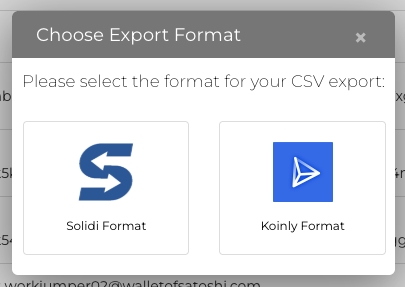
- In the popup, select Koinly Format
- Save the CSV file to your computer
In Koinly
- Click Wallets in the menu bar
- Select Add Wallet / Exchange
- Search for Solidi and click the Solidi icon
- In the Connect to Solidi dialog:
- Enter a new wallet name (for example: “Solidi Test”)
- Click Import from file
- If prompted with Wallet already exists, choose Create New Wallet ⚠️ Don’t import into an existing wallet—this avoids duplication or mis-categorisation.
- On the Import from file screen:
- Click Browse next to Drag & Drop your files
- Select the CSV you downloaded from Solidi
- Confirm the filename is shown
- Click Import
- Wait for confirmation that the import has completed successfully
You should now see Import complete, with your Solidi transactions visible inside Koinly.
A quick tip on accuracy
If you make multiple exports over time, always import only new transactions into the same Solidi wallet in Koinly, or create a fresh wallet if you’re re-importing your full history from scratch.
Getting help
If you have questions about exporting from Solidi or notice anything that doesn’t look right after import, our support team is happy to help. For tax calculations and report settings, Koinly’s help centre provides detailed guidance tailored to your jurisdiction.
We’re excited to make crypto tax reporting simpler and clearer for Solidi customers and this is just the start.
 Solidi Blog